
Open Google Analytics. Check your organic search keywords. Then you see it. The mysterious phrase: “(not provided)”. It sits there like a locked treasure chest. You know people found you through Google. But Google will not tell you exactly what they typed. Rude? A little. Common? Very.
TLDR: “Keyword not provided” appears in Google Analytics because Google hides many organic search queries to protect user privacy. This means you cannot see every keyword that brought visitors to your site. But you can still find strong clues using Google Search Console, landing pages, SEO tools, and smart content tracking. It is annoying, but it is not the end of your SEO journey.
What Does “Keyword Not Provided” Mean?
“Keyword not provided” means Google Analytics knows a visitor came from organic search. But it does not show the exact keyword the person searched.
For example, someone might search for “best running shoes for flat feet”. They click your page. Google Analytics records the visit. But instead of showing that keyword, it shows (not provided).
So you get traffic data. But not the juicy search phrase. It is like getting a pizza box with no pizza inside. You know something happened. You just cannot enjoy the full flavor.

Why Does Google Hide Keywords?
The short answer is privacy.
Years ago, Google showed more organic keyword data in Analytics. Marketers could see many of the search terms people used. Then Google started encrypting searches for signed-in users. Over time, this became the default for most searches.
When a search is encrypted, the keyword does not pass into Google Analytics. So Analytics cannot display it.
Google says this protects users. Search queries can be very personal. People search for health issues, money problems, legal questions, relationship advice, and many other private things. Hiding keyword data helps keep that information safer.
That is the official reason. And it makes sense.
But yes, it also made SEO reporting a bit more like detective work.
Does This Mean Keyword Research Is Dead?
No. Not even close.
Keyword research is alive. It just wears sunglasses now.
You may not get every keyword inside Google Analytics. But you can still understand what people search for. You can still build content that ranks. You can still measure SEO results.
You just need to use more than one tool. Think of it like making soup. Google Analytics is one ingredient. Google Search Console is another. Landing pages, rankings, and conversions are more ingredients. Put them together, and the soup starts to taste pretty good.
Where You Still Can Find Keyword Clues
Good news. Google did not lock every door. Some doors are still open. Here are the best places to look.
1. Google Search Console
Google Search Console is your best friend here.
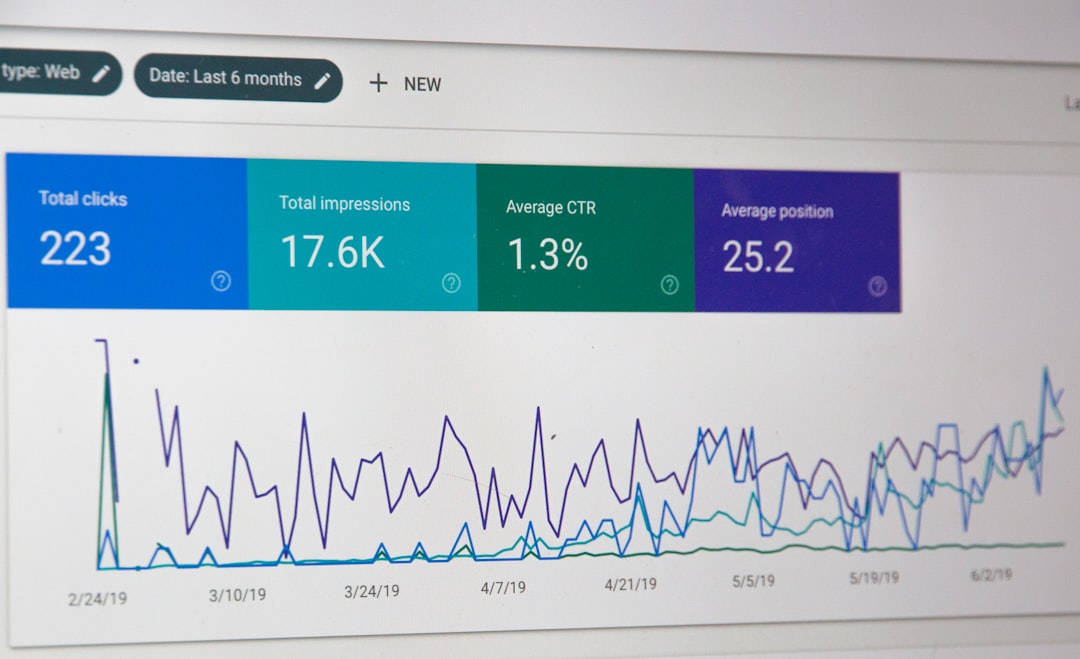
It shows search queries that caused your pages to appear in Google results. You can see:
- Queries people searched
- Clicks to your site
- Impressions in search results
- Average position
- Click-through rate
This is not exactly the same as full keyword data in Analytics. But it is very useful. You can connect Search Console with Google Analytics too. That gives you a better view in one place.
Just remember one thing. Search Console data is sampled and limited. It does not show everything forever. Still, it is one of the best free tools for solving the keyword mystery.
2. Landing Pages
Look at the pages people enter from organic search.
If a blog post about “easy vegan breakfast ideas” gets lots of organic traffic, you can guess what types of searches are bringing people in. Maybe they searched for vegan breakfast, quick vegan meals, or plant-based breakfast ideas.
No, it is not perfect. But it is practical.
In Google Analytics, go to your landing page reports. Filter for organic search traffic. Then study which pages get visits, engagement, and conversions.
This tells you what content is working. It also helps you plan what to improve next.

3. Internal Site Search
If your website has a search box, track what people type into it.
This is gold.
Visitors use your site search when they cannot find something fast. Their searches show what they want in their own words. These terms can inspire new pages, better navigation, and fresh blog topics.
For example, if many visitors search for “pricing”, make your pricing page easier to find. If they search for “refund policy”, improve that page. If they search for “beginner guide”, create one.
4. SEO Tools
Third-party SEO tools can help fill the gap. They can show keyword rankings, search volume, competition, and competitor keywords.
Popular types of tool features include:
- Keyword research
- Rank tracking
- Competitor analysis
- Backlink checks
- Content gap reports
These tools do not unlock the exact hidden keywords in Google Analytics. Nobody can magically restore all of that data. But they give you strong estimates and patterns.
5. Google Ads Data
If you run Google Ads, you can see search terms from paid campaigns. This data can help your SEO strategy too.
Paid search data shows what people type before clicking ads. If certain terms convert well in ads, they may be worth targeting with organic content.
Be careful, though. Paid and organic users can behave differently. Use the data as a clue, not as an absolute truth.
How to Deal With “Not Provided” Like a Pro
You cannot remove (not provided) from Google Analytics. There is no secret switch. There is no magic button. If someone claims they can recover all hidden organic keywords, raise one eyebrow.
But you can build a smart process.
Step 1: Connect Google Search Console
Connect Search Console to Google Analytics. This gives you query and landing page data together. It makes reporting easier and less messy.
Step 2: Group Pages by Topic
Do not only look at single pages. Group related pages by topic.
For example:
- Beginner guides
- Product pages
- Comparison articles
- Local service pages
- How-to tutorials
This helps you see which themes bring traffic. Sometimes the topic matters more than one exact keyword.
Step 3: Track Conversions by Landing Page
Traffic is nice. Money is nicer. Leads are nicer too.
Check which organic landing pages bring signups, purchases, calls, downloads, or form submissions. A page with fewer visits but more conversions may be more valuable than a page with tons of casual readers.
Step 4: Use Query Data to Improve Content
Search Console shows queries your pages already appear for. Use that data to upgrade your content.
Ask simple questions:
- Are people searching for a topic I only briefly mention?
- Should I add a clearer section?
- Can I improve the title?
- Can I answer the question faster?
- Can I add examples, FAQs, or tables?
Small edits can bring big gains. SEO is often a game of tiny improvements stacked together.
What Not to Do
When you see (not provided), do not panic. Also, do not do these things:
- Do not obsess over one keyword. Search behavior is messy.
- Do not trust fake recovery tools. Hidden data is hidden.
- Do not ignore landing pages. They tell a big part of the story.
- Do not write only for bots. Humans buy, subscribe, and share.
- Do not stop doing keyword research. Just use more sources.
The Simple Way to Think About It
“Keyword not provided” is not a wall. It is fog.
You may not see every step ahead. But you can still move in the right direction. Search Console shows queries. Landing pages show performance. Conversions show value. SEO tools show opportunities. Together, they give you a useful map.
The goal is not to know every single keyword. The goal is to understand your audience.
What do they need? What questions do they ask? What problems bother them? What pages help them most? Answer those questions, and your SEO will be much stronger.
Final Thoughts
Keyword not provided in Google Analytics can feel frustrating. It hides useful information. It makes reports less clear. It turns marketers into part-time detectives with coffee cups.
But it is manageable.
Use Google Search Console. Study landing pages. Track conversions. Watch internal search. Use SEO tools when needed. Most of all, focus on helpful content that matches real search intent.
You may not get every keyword back. But you can still build a smart SEO strategy. And yes, you can still win the search game, even when Google keeps a few cards face down.