YouTube Analytics should be treated as the source of truth for channel views, while vidIQ works best as a research and comparison layer. YouTube Analytics shows the numbers that come directly from the channel’s own data. vidIQ adds context, keyword signals, competitor estimates, and faster surface-level checks. For serious reporting, the best setup is simple: use YouTube Analytics for accuracy, then use vidIQ to spot patterns and ideas worth testing.
TLDR: YouTube Analytics is better for exact channel view reporting, while vidIQ is better for quick research, comparison, and content planning. For example, a channel might see 128,000 views in YouTube Analytics for the last 28 days, while vidIQ helps show that three competing channels gained 18% to 35% more views from similar topics. A small education channel could use YouTube Analytics to confirm that Shorts produced 62% of total views, then use vidIQ to find related keywords with lower competition. The smartest workflow uses both, not one or the other.
What “Views From Channels” Really Means
Channel views can mean two slightly different things. In YouTube Analytics, it usually means total views received by a creator’s own channel across videos, Shorts, live streams, traffic sources, and time ranges. It can also refer to views that come from channel pages as a traffic source, such as viewers clicking a video from a creator’s channel homepage.
In vidIQ, channel views often mean a broader public-facing view count, trend estimate, or competitor metric. The tool may show total channel views, recent view growth, video performance, and ranking signals. That makes it useful, but not identical to YouTube’s internal reporting.
This difference matters. A manager preparing a sponsor report needs verified numbers. A strategist planning next month’s video topics needs context. One tool answers what happened. The other helps explain what might be worth trying next.
YouTube Analytics: Best for Owned Channel Accuracy
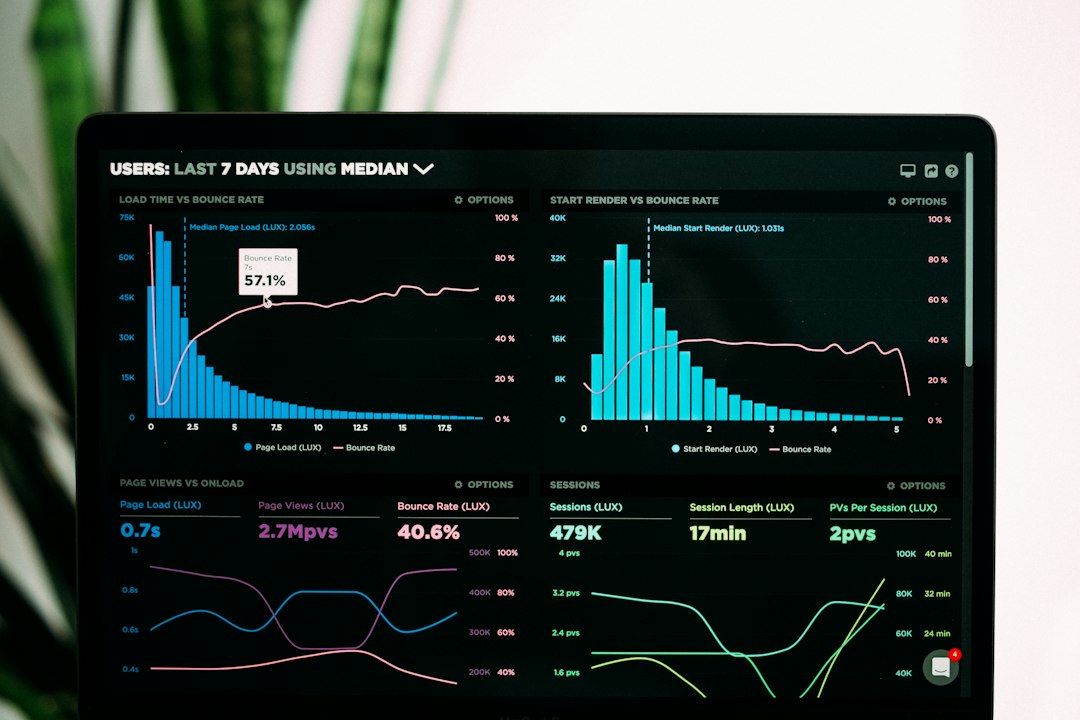
YouTube Analytics gives creators the cleanest view of their own performance. It measures views, impressions, click-through rate, watch time, average view duration, audience retention, returning viewers, traffic sources, geography, devices, and revenue data where monetization applies.
For channel view analysis, its main strength is trust. The data comes from YouTube itself. It can be filtered by date, content type, geography, subscription status, traffic source, and video. A creator can compare the last 28 days with the previous 28 days and see whether growth came from Shorts, search, suggested videos, browse features, external links, or the channel page.
The tool is especially strong for these tasks:
- Reporting total channel views for a selected date range.
- Finding traffic sources that drive the most views.
- Checking whether views are meaningful through watch time and retention.
- Separating Shorts, videos, and live streams for cleaner analysis.
- Measuring audience behavior from returning and new viewers.
The catch is that YouTube Analytics can feel slow when teams want quick comparisons. Competitor research is limited. It also hides some broader market signals that creators often want, such as which nearby topics are picking up speed across similar channels. It drives analysts crazy that a simple comparison sometimes takes several clicks, filters, and exports before the answer feels clear.
vidIQ: Best for Research, Ideas, and Competitor Context
vidIQ is not a replacement for YouTube Analytics. It is more like a research assistant for creators who want to understand why some channels are gaining views and what topics may deserve attention.
vidIQ can show channel-level performance snapshots, keyword scores, video tags, topic trends, competitor tracking, estimated views per hour, and optimization suggestions. For teams managing multiple channels, those quick comparisons are useful. A creator can glance at a competitor’s recent uploads and see which titles, subjects, and formats appear to be earning traction.
Its strongest use cases include:
- Comparing public channel growth across competing creators.
- Finding topics with search interest and lower competition.
- Reviewing video optimization through titles, tags, descriptions, and keywords.
- Spotting high-performing uploads outside the creator’s own channel.
- Planning content based on patterns in similar channels.
Honestly, it feels like vidIQ sometimes gives too many signals at once. Scores, grades, tags, alerts, and prompts can push a creator into tweaking small details instead of fixing the real issue: weak topic choice or poor viewer retention. The tool is helpful, but it should not become the boss.

Accuracy: YouTube Analytics Wins
For exact views, YouTube Analytics wins without much debate. Its numbers are the official record for the owner of the channel. If a brand asks how many views a campaign received, the answer should come from YouTube Analytics.
vidIQ may display public data, estimates, or processed metrics. Those can be useful for trend spotting, but they can differ from internal YouTube figures. That is normal. Public tools do not see every private reporting layer available to the channel owner.
A practical example makes this clear. A cooking channel may show 410,500 views in YouTube Analytics during a monthly campaign. vidIQ might show a slightly different total or focus on recent public growth. For invoices, sponsor decks, and internal performance reviews, the YouTube Analytics number should be used.
Speed and Usability: vidIQ Feels Faster for Research
vidIQ often feels quicker when the goal is to scan many channels or videos. It can reduce the time spent opening tabs, checking public video pages, and guessing which topics are gaining attention.
For example, a marketing team studying ten fitness channels may use vidIQ to find that videos about “walking workouts” are gaining more views than longer gym routines. Then the team can return to YouTube Analytics and check whether its own audience already responds well to similar topics.
YouTube Analytics is deeper, but it is not always fast. A creator may need to move between Advanced Mode, traffic source reports, content tabs, and audience reports. That extra detail is valuable, but it can be clunky during early research.
Best Workflow for Analyzing Channel Views
The strongest workflow uses both tools in a clear order:
- Start in YouTube Analytics. Check total views, watch time, retention, traffic sources, and content type.
- Identify the view driver. Separate Shorts spikes from long-form growth.
- Check quality. High views with low retention may not support long-term growth.
- Use vidIQ for comparison. Study competitor topics, titles, and recent winners.
- Return to YouTube Analytics. Test ideas, then measure real performance.
This keeps the team grounded. YouTube Analytics confirms reality. vidIQ helps find options. Neither tool should be read in isolation.
Which Tool Is Better for Different Users?
Solo creators should start with YouTube Analytics. It is free, official, and enough for basic growth decisions. vidIQ becomes useful once the creator wants keyword research, competitor tracking, or faster topic discovery.
Agencies benefit from both. YouTube Analytics supports client reporting. vidIQ supports research across niches and competitors. The split is clean and easy to explain.
Brands should rely on YouTube Analytics for campaign measurement. vidIQ can support planning before a launch, especially when the brand studies creators, trends, and search demand.
Data-heavy teams may need exports from YouTube Analytics and separate dashboards. vidIQ can still help, but it should sit beside reporting tools, not replace them.
Final Recommendation
For analyzing channel views, YouTube Analytics is the better tool for truth. It gives the most accurate view data, the richest owned-channel filters, and the clearest link between views, watch time, retention, and revenue.
vidIQ is better for context. It helps creators study competitors, identify topic gaps, and move faster during content research. The best result comes from pairing them: one tool measures performance, and the other helps shape the next move.
FAQ
Is YouTube Analytics more accurate than vidIQ for channel views?
Yes. YouTube Analytics is the official source for a channel owner’s view data. vidIQ is useful for research and public comparisons, but its numbers may not match internal YouTube reports.
Can vidIQ show views from competing channels?
vidIQ can show public channel metrics, estimated performance, and competitor trends. This makes it helpful for research, but it should not be treated as verified internal data.
Which tool is better for sponsor reports?
YouTube Analytics is better for sponsor reports. It provides official view counts, watch time, geography, traffic sources, and other campaign metrics.
Does vidIQ help increase channel views?
vidIQ can help with topic research, keyword ideas, and competitor analysis. It does not increase views by itself. Better topics, stronger packaging, and higher retention still matter most.
Should small creators pay for vidIQ?
Small creators should first learn YouTube Analytics. If they need faster research, keyword help, or competitor tracking, vidIQ may be worth testing.
What is the best way to use both tools together?
A creator should measure performance in YouTube Analytics, then use vidIQ to study topics and competitors. After publishing new videos, the creator should return to YouTube Analytics to judge real results.