
A YouTube automation agent is most useful when it handles repeatable work while humans keep control of judgment, taste, accuracy, and brand voice. Used well, it can support research, scripting, production, publishing, analytics, and channel management without turning the channel into low-quality automated noise.
TLDR: A YouTube automation agent can reduce the time spent on routine video tasks by organizing research, drafting scripts, preparing metadata, scheduling uploads, and tracking performance. For example, a small education channel publishing three videos per week might cut pre-production time from 10 hours to 6 hours by automating topic research, outline creation, and SEO checks. If average click-through rate rises from 4.2% to 5.1% after better title testing, that can mean thousands of extra impressions turning into views. The best results come when AI supports the workflow, not when it replaces editorial review.

What Is a YouTube Automation Agent?
A YouTube automation agent is an AI-powered system that performs or coordinates tasks across a YouTube workflow. It may use language models, data tools, scheduling software, transcription tools, image generators, video editors, and analytics dashboards. Unlike a simple chatbot, an agent can follow a process: collect inputs, complete steps, check results, and pass work to the next stage.
This does not mean the agent should run a channel on autopilot. That is where many channels get into trouble. Thin scripts, copied ideas, robotic voiceovers, and generic thumbnails can hurt trust fast. The better use case is practical: let AI handle the repetitive parts so creators and teams can focus on originality, accuracy, and audience connection.
1. Research and Topic Selection
Research is one of the strongest use cases for a YouTube automation agent. A creator can ask the agent to scan competitor videos, identify recurring questions, group audience pain points, and find gaps in existing content. It can also summarize viewer comments, Reddit discussions, Google search trends, and past channel analytics.
For example, an agent might detect that videos about “beginner camera settings” get high watch time, while videos about “gear reviews” get more clicks but weaker retention. That insight helps the creator plan content with clearer intent. It can also warn against chasing a topic that looks popular but does not match the channel’s audience.
- Topic clustering: Groups related ideas into content pillars.
- Competitor review: Summarizes titles, formats, hooks, and viewer complaints.
- Search intent mapping: Connects video ideas to what people actually want answered.
- Performance review: Finds patterns in click-through rate, retention, and comments.
Honestly, it feels like a waste when creators spend two hours copying video titles into a spreadsheet by hand. An agent can do that in minutes, then produce a cleaner brief for human review.
2. Scripting and Editorial Support
AI can draft scripts quickly, but speed is not the same as quality. A serious YouTube automation agent should support scripting through structure, not blind content generation. It can create hooks, outlines, talking points, transitions, source lists, and versions for different audience levels.
A good agent can also check whether the script answers the title promise. This matters. If the title says “How to Save $500 a Month,” the script should not spend four minutes on vague motivation. It should provide steps, numbers, tradeoffs, and examples.
Useful scripting tasks include:
- Drafting a 30-second opening hook.
- Turning research notes into a structured outline.
- Creating a short version and a long version of the same script.
- Flagging weak claims that need sources.
- Suggesting clearer examples for complex topics.
The human role is still central. Someone must check facts, tone, pacing, legal risks, and brand fit. AI often sounds confident even when it is wrong. That is not a small issue. In finance, health, education, or legal content, careless automation can damage viewers and the channel.

3. Production and Asset Preparation
Production work includes many small jobs that drain time. A YouTube automation agent can create shot lists, b-roll prompts, voiceover drafts, captions, chapter markers, thumbnail concepts, and editing notes. It can also prepare a production checklist based on the video type.
For a talking-head video, the agent might generate a list of on-screen graphics needed at specific timestamps. For a tutorial, it might identify where screen recordings, zoom-ins, or callouts should appear. For an interview, it can mark strong quotes and suggest short clips for Shorts or other social channels.
There are limits. AI-generated visuals and voiceovers can feel bland if used without direction. Viewers notice. They may not name the problem, but they feel the lack of personality. A practical agent should speed up assembly, not flatten the channel’s style.
4. Publishing, SEO, and Metadata
Publishing is another area where automation can help a lot. A YouTube automation agent can draft titles, descriptions, tags, chapters, pinned comments, end-screen suggestions, and community posts. It can also prepare A/B title options and check whether the packaging matches the video’s actual content.
Metadata support may include:
- Title testing: Creates several title angles based on clarity, curiosity, and search demand.
- Description writing: Adds concise summaries, links, sources, and calls to action.
- Chapter creation: Uses transcripts to build timestamps.
- Upload checks: Confirms resolution, captions, thumbnail, monetization settings, and visibility.
The catch is that many tools still add tiny delays in annoying places. A thumbnail export that takes 40 seconds longer than usual does not sound like much. After ten revisions, it is irritating. The best systems reduce clicks, not add another dashboard to babysit.
5. Channel Management and Analytics
After publishing, the agent can monitor performance and report what changed. This is where AI becomes more useful than a static checklist. It can track the first 24 hours, compare the video to channel averages, and identify likely issues.
For example, a video may have a strong click-through rate but poor retention after the first minute. That often points to a weak intro or a mismatch between title and content. Another video may have low clicks but strong retention, which suggests the topic is good but the packaging needs work.
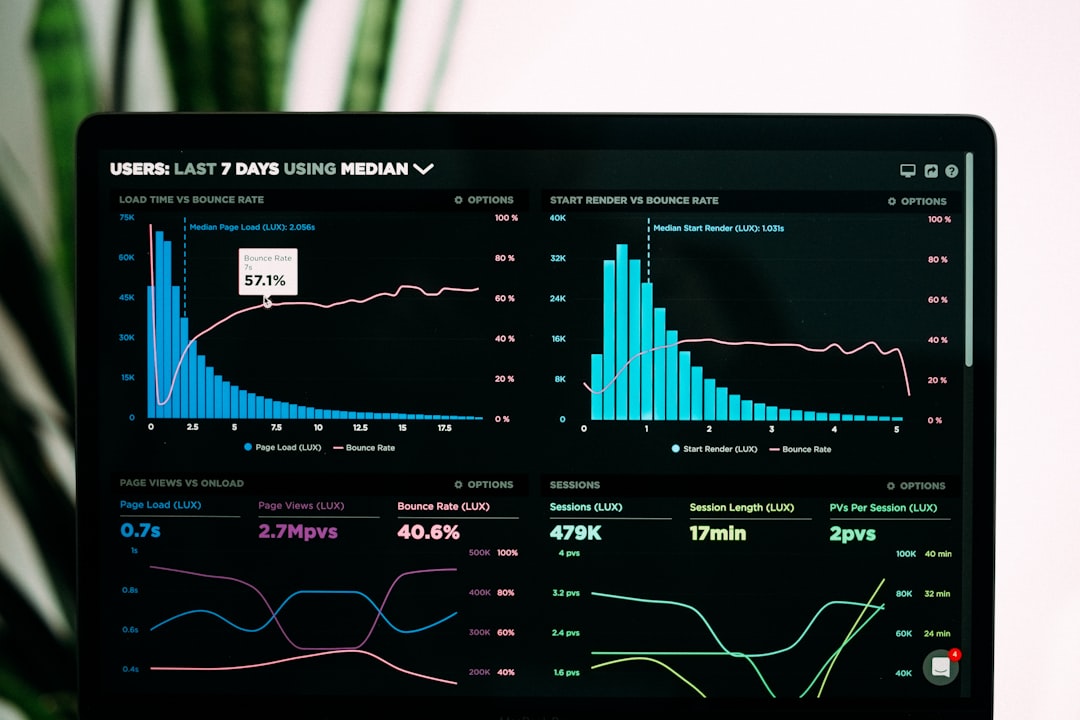
A serious automation setup can send a weekly report with plain-language recommendations:
- Three topics that gained above-average watch time.
- Two thumbnails with below-average click-through rate.
- Common viewer questions from comments.
- Videos suitable for updates, sequels, or Shorts.
- Content types that should be paused due to weak results.
What Should Stay Human?
AI should not make every decision. Editorial judgment, ethical review, lived experience, humor, taste, and accountability should stay with people. Viewers subscribe because they trust a voice, not because a workflow is efficient.
Human review is especially critical for claims, quotes, sponsorship language, copyright issues, and sensitive topics. Creators should keep records of sources and AI-assisted steps. This protects quality and makes the process easier to audit later.
A Practical Workflow
A balanced YouTube automation workflow might look like this:
- Agent researches topics, comments, trends, and past analytics.
- Creator selects the final idea and angle.
- Agent drafts the outline, script options, and production notes.
- Editor or creator reviews accuracy, tone, and originality.
- Agent prepares metadata, captions, chapters, and publishing checklist.
- Human approves upload settings and final packaging.
- Agent monitors analytics and creates a performance report.
Final Thought
A YouTube automation agent can make a channel more consistent, organized, and data-aware. It can save hours each week and reduce the busywork that slows production. But it should be treated as an operations assistant, not a creative replacement. The strongest channels will use AI to improve process quality while keeping real human standards at the center.